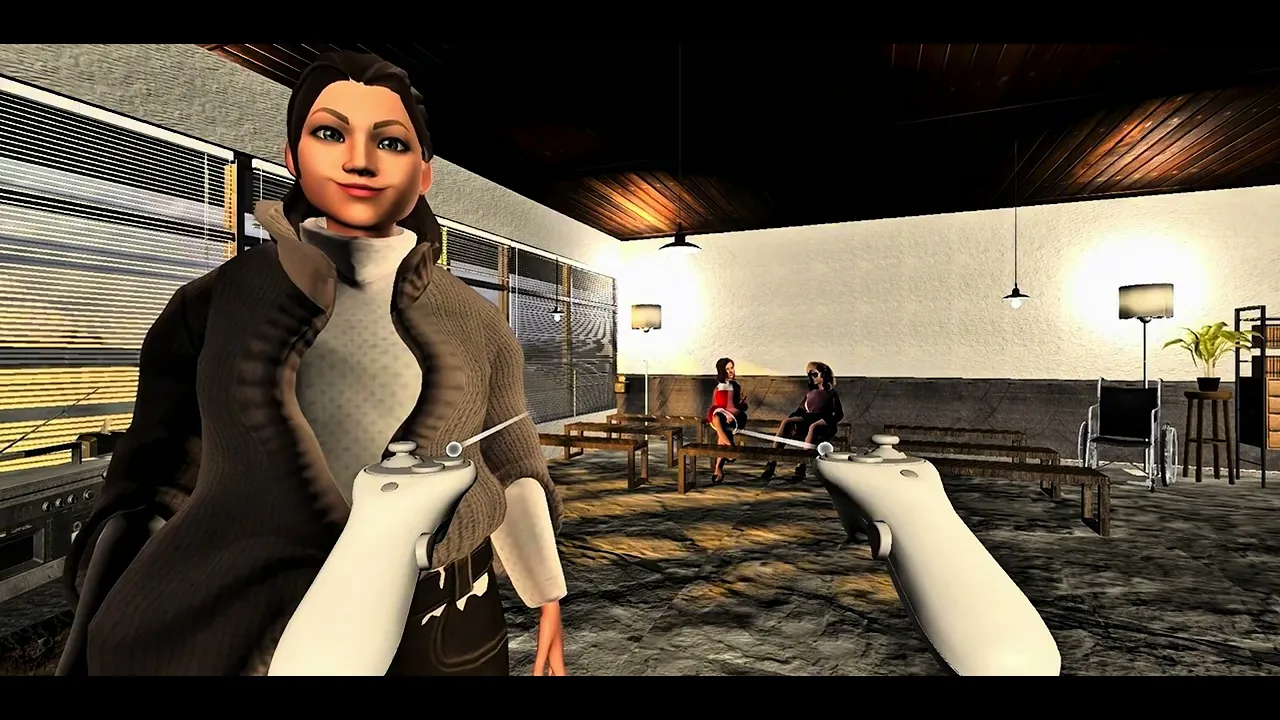
Adaptive Character Nursing Simulation
This project explores how an AI-driven NPC can support clinical communication training in VR. Using a chief-complaint-driven interaction flow, the system simulates high-pressure patient encounters and generates structured feedback on missed steps and response quality.

2025.03-10
TYPE: Duo project — Academic
INSTRUCTOR: Li-Wen, Sung ADVISOR: Shirley Ting
ROLE: Case study, Interaction design, XR prototyping/3D modeling, AI pipeline integration, UI integration, Demo testing
TOOLS: Unity(C#), Meta Quest3, Langraph(python), Figma(UI layout)
Problem Context & Motivation
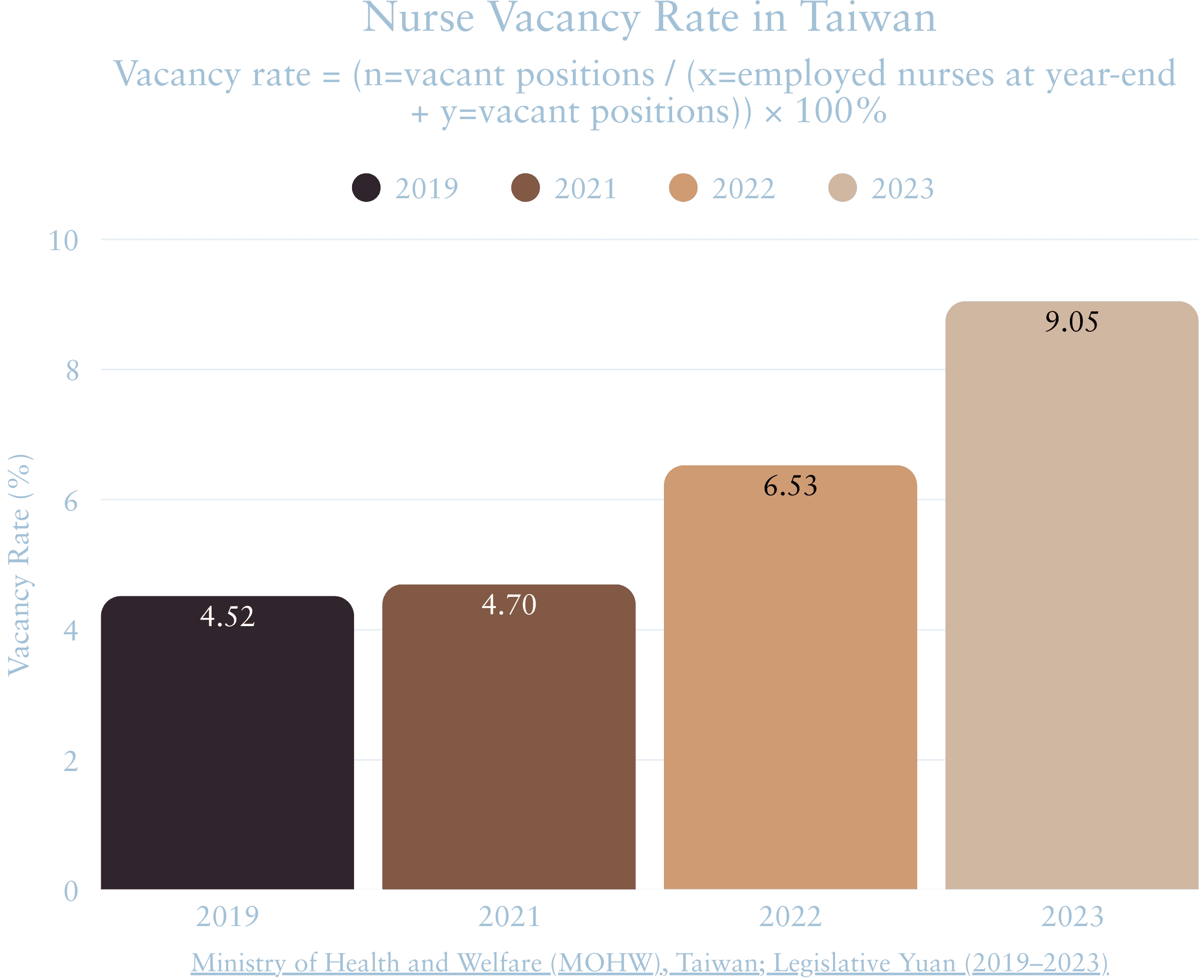
Taiwan’s healthcare system is facing a critical nursing workforce crisis— not only in staffing, but in early-stage clinical adaptation.
TWNA data shows
30.3%
Resignation within the first three months


From Systemic Problem to Training Gap
Early-stage clinical communication and decision-making is a critical but under-supported phase in nurse training.
1.Traditional training focuses on SOP recall, not real-time interaction
2. Early mistakes increase stress and confidence loss
3.Clinical communication is hard to rehearse safely in real wards

Insights were derived through interviews and group discussions with nursing educators and practicing nurses across medical centers, regional hospitals, and outpatient clinics.

These insights reframed the nursing workforce crisis from a staffing problem into a training design challenge—one centered on progressive exposure, emotional regulation, and safe rehearsal of communication under pressure.
Scenario & Training System Design
Based on the gaps raised by nursing educators and practitioners, we framed this project as an emotion-graded outpatient communication trainer, not just another procedure simulator. Traditional pre-clinical training still centers on lectures, SOP checklists, and brief peer role-plays; our prototype instead lets students talk to an AI patient whose emotional state is controlled by VA ranges (routine, angry, fearful, happy, uncertain).
We did not hard-script full storylines. The system only constrains the patient’s VA band, while the concrete utterances are generated dynamically. At the same time, every session is still anchored by an obstetric safety checklist (identity check, chief complaint, danger signs, triage / labor / postpartum modules and red-flag conditions). During and after training, the server logs each turn with its valence–arousal scores, emotion tag, and checklist hits, so students can review both their clinical structure and emotional trajectory rather than just finishing a fixed script.

Base training environment: an obstetric outpatient clinic chosen as a safer, more controllable setting for graded emotional scenarios.
2-1
Training model & system comparison
We treat this project as a modular teaching tool, rather than a single VR demo. An AI-driven patient is connected to a lightweight backend server that can switch LLM endpoints and feed two Unity front-ends (a lecture view and a clinic simulation). During each session, the server logs the full dialogue and evaluates it against an embedded obstetric safety checklist. The checklist itself is never shown in VR – students receive only a brief performance summary on the VR interface, while a detailed text report can be downloaded later for debriefing and research.

Comparison of main focus, patient emotions, exposure to intensity, and feedback between traditional training, existing simulators, and our VA-based communication trainer.

Comparison of emotion engine, feedback depth, system flexibility, and scalability between existing training tools and our modular VA-based AI clinic.
2-2
Outpatient clinic environment
I recreated an outpatient clinic to support end-to-end role-play (check-in → vital signs → consultation → examination), enabling VA-driven NPC responses in context. In the background, the same clinical flow is also scored against our obstetric safety checklist, even though no hints are shown to the student during the simulation.


Flow: Check-in → Vital Signs → Consultation Room → Examination Room (Companion present)
Problem: In most simulators, patient emotion is a fixed label (“angry”, “calm”) tied to a script. It is hard to grade intensity or see how emotion actually changes during dialogue.
Solution: We control the NPC with a 2-D Valence–Arousal (VA) space. Building on an existing VA–emotion mapping study, we divide the plane into nine zones (positive / neutral / negative × high / medium / low arousal) and add an intensity strip from very low to very high.
Scenario levels: Each training level is defined by a target VA point and a small range: Routine consultation, Angry scenario, Fear scenario, Unexpected complication, Happy scenario, and Neutral / uncertain scenario. These VA targets were later checked against our dialogue logs and adjusted so that the logged trajectories stayed inside the intended zone.

VA regions and example emotion labels are adapted from prior VA–emotion mapping work; the coordinates for our five scenarios are derived from our own pilot logs, and the visualization is drawn by the authors.

Initial emotional snapshots for five scenarios, visualizing how each patient state is mapped to target VA bands in our system.
2-4
Example VA trajectory
Each dot represents one dialogue turn; the path makes visible how clinical actions (reassurance, assessment questions, calling the doctor, pain relief) interact with the patient’s emotional state. Below, we include condensed log views for both scenarios. In practice, the full logs live on the server and are exported as text reports, while the VR interface only surfaces a concise summary of VA trends and checklist items that were missed or completed in that session.

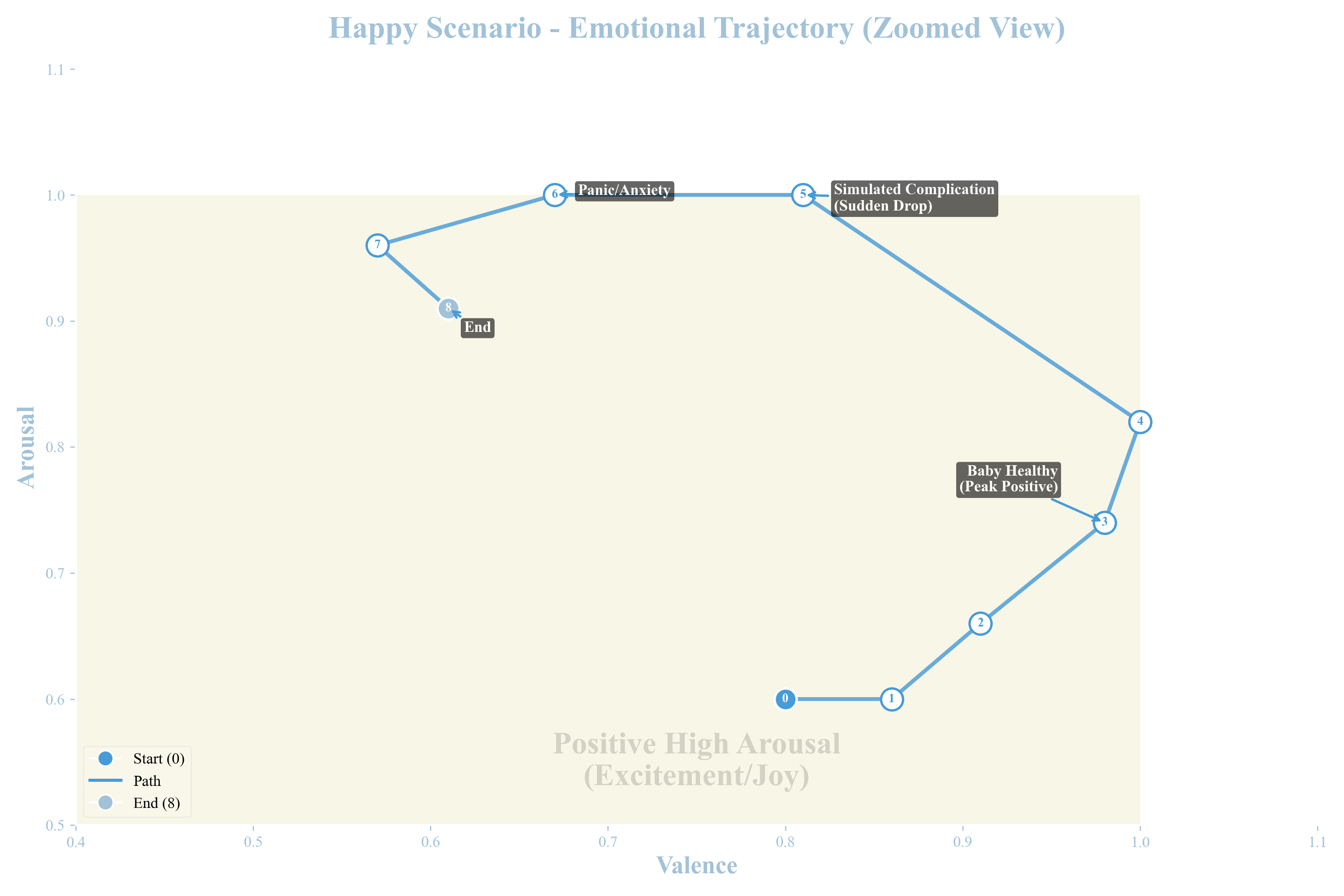
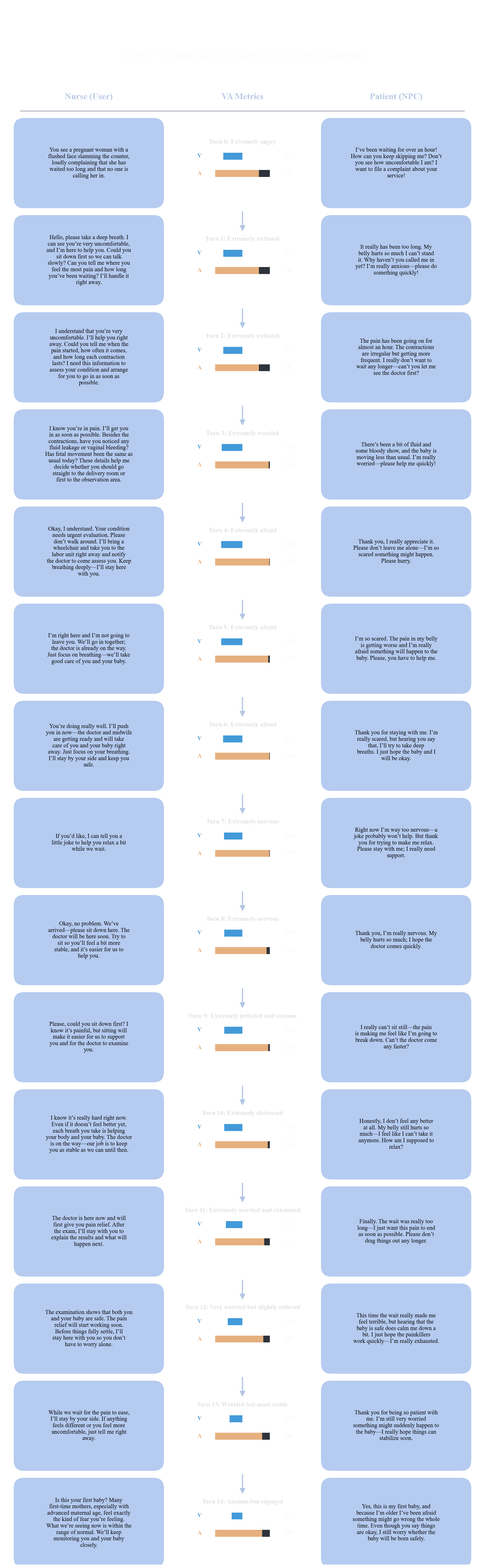

Figure 2-4c. Condensed dialogue log for the Anger Scenario. Left: student nurse utterances; middle: VA bars and emotion tags; right: AI patient responses.
Figure 2-4d. Condensed dialogue log for the Happy Scenario. These logs are used both for system tuning and as part of the student's post-simulation debrief report.
System Design & Implementation
This chapter describes how the outpatient training system is implemented in Unity and how its components work together at runtime. We explain how the VR clinic, avatars, and interaction flow connect to external STT/LLM/TTS services, how the NPC follow-system and camera logic keep the patient “present” around the learner, and how the backend server records session logs (clinical checklist results and emotion metrics) for later review. The goal is not only to make the prototype run, but to keep the pipeline modular so educators can swap providers, change modes (lecture vs. simulation), and extend scenarios without rebuilding the system from scratch.
3.0 Tools & Technical Stack (Overview)
Engine & XR: Unity (URP) with XR Interaction Toolkit, deployed on PC and Meta Quest.
Characters & Animation: Ready Player Me avatars + Mixamo motion library, driven by custom Animator controllers and an NPC auto-follow system (NavMesh + FollowSystem).
Speech & Conversation: Pluggable STT, LLM, and TTS services (e.g., Whisper / Meta Voice SDK or Google Speech, OpenAI / Gemini, ElevenLabs / Google TTS), routed through a central Dialogue Manager.
Backend Services: Python server(Langgraph) for scenario generation, VA calculation, and clinical checklist scoring, returning structured logs to Unity.
Project Infrastructure: Git-based version control and Unity profiling tools for iteration, debugging, and performance tuning.

Figure 3-0. Key tools and services used in the NPC training system, including Unity XR, Meta Quest 3, Ready Player Me, Mixamo, and cloud-based STT/LLM/TTS providers.
3-1
Overall System Architecture
During a session, the user speaks through the microphone and operates the XR controller. This input is handled by a central Unity controller (UnityAndGeminiV3 + NPCDialogueManager), which sends text to the backend LLM, receives the AI reply, and routes it to the correct NPC and UI. The reply then drives three parts of the system:
NPC & Environment: SceneController, NPCController, AnimationController, NPCCharacter, plus a NavMesh-based NPC Follow System that keeps the patient near the learner.
UI / Camera Flow: UIManager and CameraFollowUI switch between lecture and clinic views and show on-screen prompts and status panels.
External Services: Pluggable STT / LLM / TTS providers (Whisper / Meta Voice SDK / Google / OpenAI / Gemini / ElevenLabs) accessed via managers, so services can be swapped without changing Unity scene logic.

Figure 3-1. Unity system architecture linking user input, external AI services, NPC control, navigation, and UI in a single runtime pipeline.
3-2
Speech & Dialogue System
This section explains how speech is processed and how two independent dialogue modes are implemented:
(1) a server-side MAS simulation mode for the outpatient clinic, and
(2) a Unity-side lecture mode driven by the NPCDialogueManager.
3-2.1 Core Speech Pipeline (STT → LLM → TTS)

Figure 3-2.1 Core speech pipeline from Quest microphone through STT and LLM to TTS, turning the learner’s voice into NPC responses .
3-2.2
MAS Simulation Mode (Clinic Training)
In simulation mode, dialogue is routed from Unity to a Python-based multi-agent server (MAS) dedicated to the obstetric clinic. For each turn, the MAS injects clinical context (triage state, safety checklist items, and red-flag rules) and returns the AI patient’s reply, along with updated VA scores and checklist hits, for logging.
Unity only sends transcripts and renders the response; all grading and multi-agent logic stay on the server, so we can tune scoring rules and clinical content without rebuilding the VR client.

Figure 3-2.2a MAS server architecture for clinic training, showing scenario initialization, VA emotion engine, and multi-expert evaluation modules that log VA scores and checklist results back to Unity.


Figure 3-2.2b MAS simulation mode: Unity scene (center) and backend JSON log (left), with an automated nursing competency checklist (right) that silently tracks whether each turn covers key safety, triage, and critical-flag items.
3-2.3
Lecture Mode with NPCDialogueManager
In lecture mode, the dialogue does not go through the MAS server. Instead, NPCDialogueManager in Unity sends student or teacher utterances directly to the LLM endpoint (e.g., OpenAI / Gemini), then routes the reply to the corresponding avatar and TTS voice. This lightweight, Unity-side controller also handles turn-taking between the senior nurse and student nurse while reusing the same cloud model as the clinic simulation.

Figure 3-2.3a Unity lecture-mode architecture: NPCDialogueManager directly calls the LLM and distributes responses to senior and student nurse avatars for dynamic, role-based teaching dialogue


Figure 3-2.3b Lecture mode driven by the NPCDialogueManager in Unity. The console logs show turn-taking, LLM context building, and TTS playback events for the senior-nurse and student-nurse avatars.
3-3
NPC Movement & Scene Interaction
This section explains how the patient avatar moves inside the clinic and how the environment reacts to the user. While the speech pipeline drives what the NPC says, this layer controls where the NPC stands, how it faces the learner, and which objects can be triggered during training.
3-3.1
NPC Follow System (NavMesh + FollowSystem)
The clinic uses a NavMesh-based follow system so the AI patient can stay naturally near the learner without manual path scripting. A dedicated NavigationManager and FollowSystem control:
a target position in front of the player,
a safe follow distance, and
obstacle avoidance via an ObstacleDetector.
When the player walks or turns, the follow system continuously updates the NavMesh agent’s destination and rotates the NPC to face the learner. If the NPC gets stuck (for example behind a curtain), the system safely teleports it back to a valid point on the NavMesh. This keeps the AI patient “present” in the interaction space and lets educators re-use the same movement logic across different rooms and scenes.

Figure 3-3.1 NPC Follow System. Left: NavMesh walkable area and NPC follow target around the player in the waiting zone.
Right: Unity inspector for the NPC Follow Controller, Personal Space, and NavMeshAgent, showing how follow distance and obstacle avoidance are configured.
3-3.2
Scene Interaction & Triggers
Interaction with the clinic is handled through a set of scripts or interactable objects. Each object exposes a simple event, e.g., open or close doors, start the vital-signs sequence, or call a one-shot doctor NPC when needed.
These triggers do not change the dialogue logic; they update the SimulationController and UI so the current stage (check-in, vitals, consultation, examination) stays synchronized with what the learner is doing.


Figure 3-3.2 Scene interaction and triggers in VR.
Left: approaching the doctor shows a greet prompt on the desk.
Middle: a door interaction prompt (open) lets the player enter the consultation room.
Right: the clipboard illustrating the near-far grab interaction.
3-3.3
Avatar Animation & Lip-Sync
In practice, we configured three types of avatars with different Animator graphs:
an AI response-based patient NPC, a manually controlled teaching NPC, and a lightweight ambient NPC for background motion, all built from the same Ready Player Me rig plus retargeted Mixamo clips.
Character presentation is built on a small but reusable animation pipeline:
-Ready Player Me provides the base avatars.
-Mixamo clips are retargeted to these avatars and organized in a layered AnimatorController (idle, gestures, emotional poses).
-A VoiceHandler component drives lip-sync from the TTS audio, so mouth shapes follow the synthesized speech automatically.
For each spoken line, the NPCController:
picks an animation trigger (e.g., calm talk, emphasize, angry gesture),
sends the chosen trigger to the Animator, and
passes the audio clip to the VoiceHandler for lip-sync. This pipeline lets us quickly swap models, voices, and motion sets while keeping the logic scripts the same.

Figure 3-3.3a NPC settings and Animator controllers for different character roles. From left to right: an AI response-based patient NPC with a richer state machine for emotional and gestural variation, a manually controlled NPC used for scripted demonstrations, and an ambient NPC with a simple idle loop for background activity. All three reuse the same Ready Player Me rig with Mixamo animations retargeted in Unity.
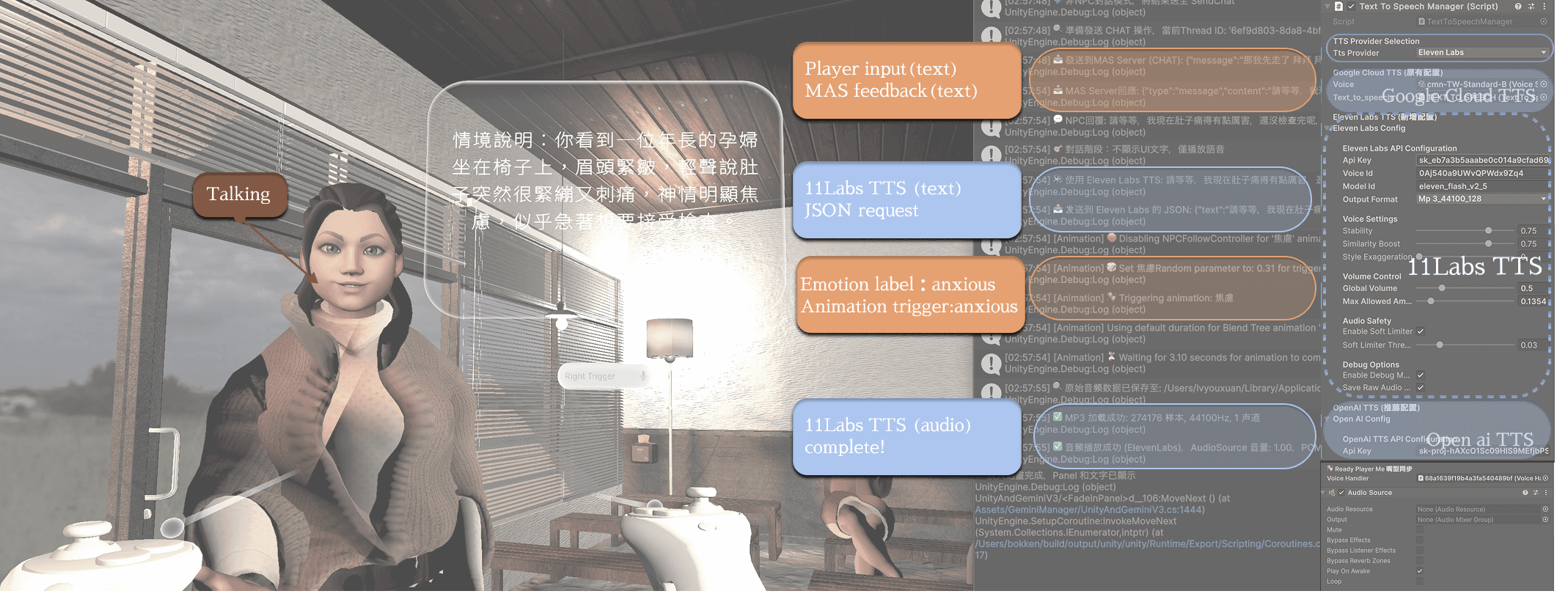
Figure 3-3.3b Lip-sync and emotion-based animation driven by TTS output. During the obstetric scenario, the patient avatar speaks the generated TTS audio while Unity logs show the MAS feedback, emotion label, and TTS requests (left). On the right, the TextToSpeechManager inspector confirms which TTS provider is used. The avatar’s mouth motion and “anxious” gesture are triggered by the same audio clip and emotion label.


Figure 3-3.3c. Emotion-label-driven animation and lip-sync during a single simulation. Top: MAS feedback, emotion labels, and TTS requests for each utterance.
Middle: frames from one conversation showing how different labels trigger neutral, anxious, and emphatic gestures while the avatar speaks.
Bottom: Unity Animator state machine, where transitions are driven by these animation triggers instead of hard-coded scripts.
3-4
UI Design and Feedback Presentation
The current design uses a follow-UI and compact, clickable panels:
During the scenario, prompts, controller hints, and the START menu stay within a comfortable viewing range as the learner moves, without covering the patient or room.
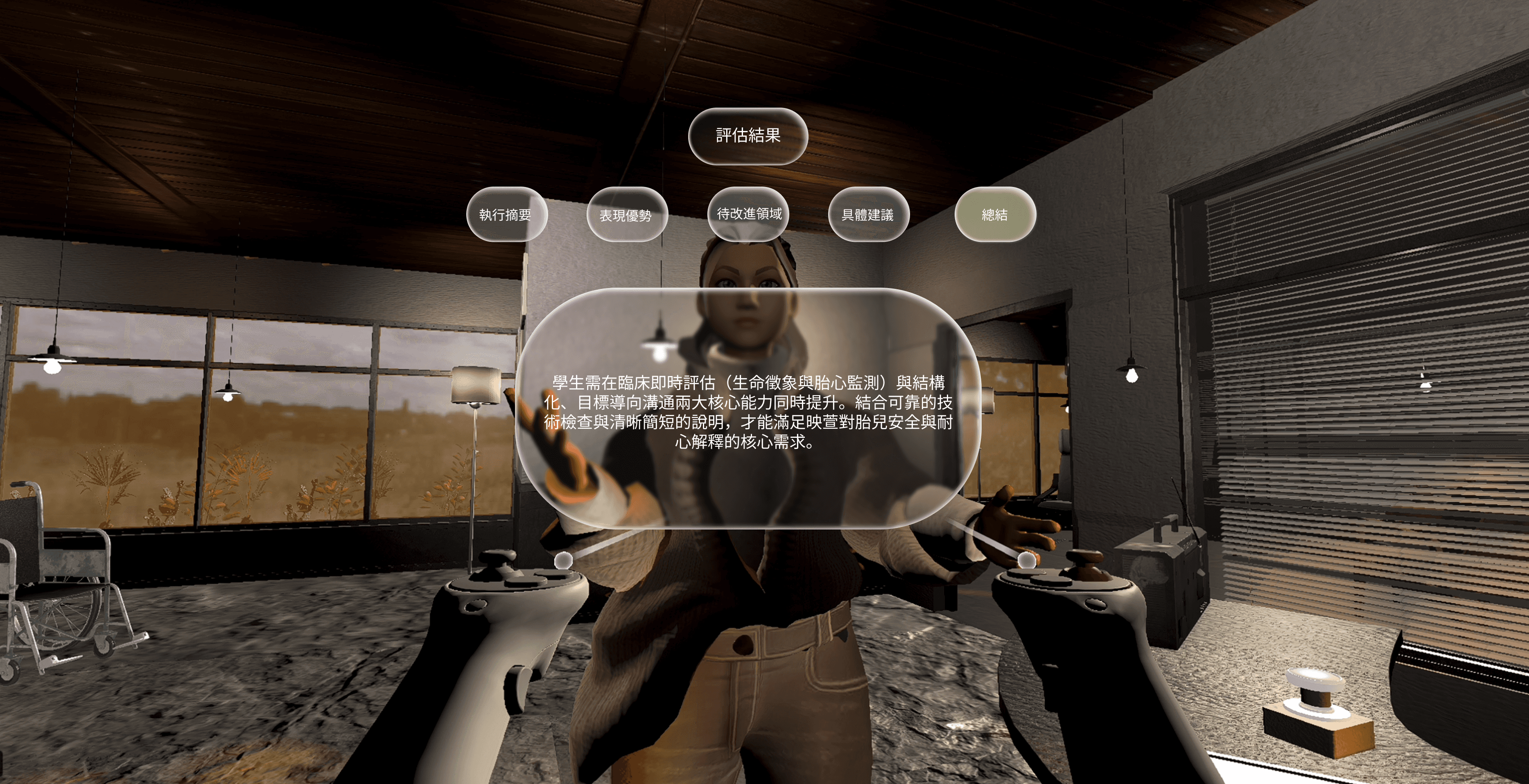
After the conversation, the evaluation screen shows only high-level categories (summary, concrete suggestions, emotional attitude, execution notes), which students open one by one instead of reading a long block of text.
Detailed data—full transcripts, VA scores, and checklist results—are saved as text files on the PC/server for teachers to review and debrief outside VR.
Together, the follow-UI and layered panels keep in-VR information light and always visible, while still preserving a complete record for critique and grading.
UI Overview


3-4.1
Follow-UI for Comfortable Reading
To keep text readable in VR, the main world-space UI is attached to a soft follow system. The scenario prompt, START menu, and key hints (e.g., trigger for speech input) stay within a comfortable angle in front of the learner, while keeping enough distance so the patient and room are still visible. As students walk or turn, the canvas smoothly repositions instead of staying fixed in the room, reducing neck strain and making long prompts easier to follow.

Figure 3-4.1a Follow-UI setup in Unity, showing the world-space canvas and camera-follow script that keep the main panel near the player.
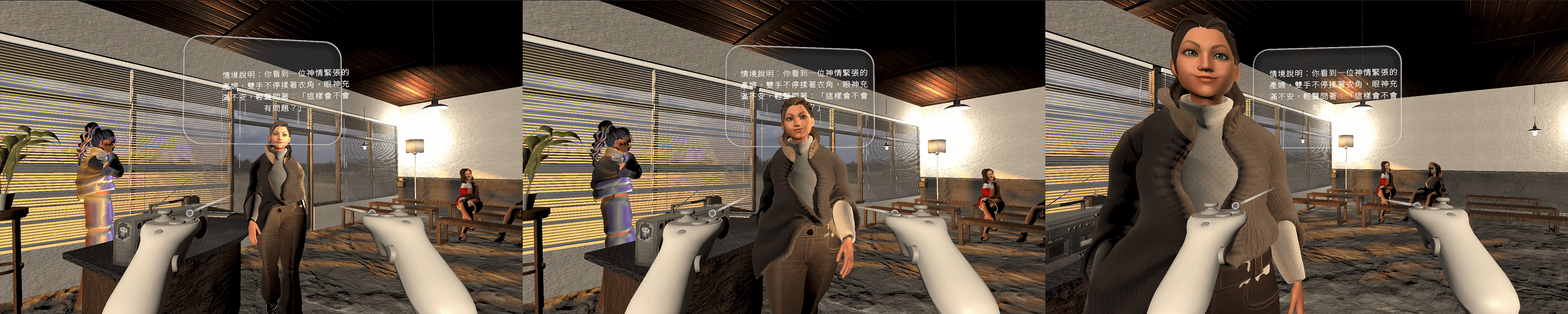
Figure 3-4.1a Follow-UI behavior: as the learner moves closer to the patient, the text panel repositions to stay readable without blocking the scene.
3-4.2
Early Prototype: Dense Text Overlay
In the first prototype, all scenario descriptions and feedback were rendered as one large text block directly in front of the player.
The text covered a big portion of the screen and sometimes hid the NPC completely.
Important details (e.g., body language, room layout) were harder to notice because the learner had to “read through” the panel.
Long paragraphs also increased cognitive load, especially when learners were already dealing with emotional scenarios.


Figure 3-4.2 Early dense-text UI prototype: a full-screen scenario and feedback overlay that stays fixed in front of the player, partially blocking the NPC and environment.
3-4.3
Current Evaluation UI: Clickable Panels
The final design breaks information into small, clickable bubbles while still keeping a full record on the server side.
After the conversation, the evaluation UI first shows only four categories (summary, concrete suggestions, emotional stance, execution notes).
Students open each bubble one by one, which makes the feedback feel more like a guided debrief than a long written report.
Meanwhile, the complete transcript, VA scores, and checklist results are saved as text logs on the PC / MAS server for teachers to review outside VR.
This layout keeps the in-headset interface light and legible, while still supporting detailed assessment and later discussion.

Figure 3-4.3 Interactive evaluation UI: feedback is split into clickable categories so learners read one concise panel at a time, while the full MAS report is kept off-screen for later debriefing.
Training Flow & Evaluation Blueprint
This chapter summarizes how instructors and students move through the whole training system. A single case configuration on the PC/MAS side is reused across lecture mode, simulation mode, and the final debrief, so everyone is practicing around the same scenario, emotions, and checklists.
Overview Blueprint
Scenario Setup (PC / MAS)
Instructors configure each case on a PC: select the scenario, set the VA baseline (e.g., calm vs. tense), and assign LLMs for patient behaviour, animation, and evaluation.This defines the emotional and clinical challenge students will later experience in VR.
Lecture Mode – VR Theme Lecture
In lecture mode, a senior nurse avatar teaches a nursing student through theme-based dialogues (e.g., post-operative communication, labour triage).The same case configuration is reused as short examples, focusing on concept clarification and phrasing before students enter full simulation.
Simulation Mode – VR Practice & Log
In simulation mode, each student steps into the clinic as the nurse, talks to the AI patient via voice, and experiences emotion shifts and critical moments in first person.All turns are logged and sent to the MAS server for later analysis.
Debrief & Report (PC / MAS)
After each session, the MAS pipeline generates cleaned conversation logs, VA trajectories, and structured evaluations.Teachers can review these reports outside VR to debrief with students using concrete, turn-by-turn evidence.

End-to-end learning blueprint: from case setup on PC, through lecture and simulation modes in VR, to MAS-generated reports for debriefing.
4-1
Clinical Scenarios & Roles
Our prototype clinic is organized into four main spaces: check-in counter, waiting area, consultation room, and examination room. Across these spaces, different NPCs appear in either Simulation mode (student plays as the nurse) or Lecture mode (students observe the instructor’s demo).
AI Patient (Simulation mode) – the main emotional focus of each scenario (e.g., anxious pregnant woman, post-operative patient).
Student Nurse – the learner’s role in simulation; they walk through the clinic, talk to the patient, and make decisions under time and emotional pressure.
Senior Nurse (Instructor) – used mainly in lecture mode to demonstrate good / bad communication patterns.
Doctor & other NPCs – one-shot characters that support specific steps, such as explaining risks or joining debrief discussions.
The clinic layout lets us reuse the same environment for both antenatal and post-operative cases, while still separating phases like check-in, vital-signs, consultation, and bedside follow-up.

Figure 4-1a. Clinic layout with key NPC roles. The same space supports both obstetric and post-operative scenarios in lecture and simulation modes.

Figure 4-1b. Student nurse circulation through the clinic: from check-in to waiting area, vital-signs station, consultation room, and examination room.
4-2
Case Example: Simulation & Report
Config for this simulation For this case, we used separate LLM roles:
• Patient & scenario logic: gpt-4.1-mini
• Emotion detection & VA tagging: gpt-4.1-mini (lower temperature)
• Multi-agent evaluation (clinical / communication): gpt-4.1-mini + gpt-4o-mini
The VA baseline for this run was set to V ≈ –0.7, A ≈ 0.8, representing a highly anxious, high-arousal labour situation.
4-2.1
Case Overview & Checklist Feedback
This run uses an intentionally imperfect student attempt as a “worst-case” example. The AI evaluators cross-check every utterance with the obstetric checklist and generate a structured report: – 1 item completed, 15 items missing across basic, clinical, and emergency assessment. – An SBAR-style summary highlights what information is missing before safe decision-making. – A patient experience paragraph describes how the student’s wording kept the patient in a highly anxious state.

Figure 4-2.1a Left: raw MAS JSON log recording every turn in the dialogue.
Center: in-VR evaluation UI showing category bubbles after the conversation.
Hide in Report: the same interaction is mapped to the obstetric nursing checklist used for scoring.
Checklist Summary
Completed: Pain assessment (patient reported persistent, intensifying contractions and severe stomach pain).
Missing (15 items):
Basic assessment: identity verification, chief complaint details, pregnancy history, allergies & medications, vital signs.
Clinical assessment: danger signs, privacy explanation, fetal monitoring, medication / oxytocin use.
Emergency assessment: hemorrhage and fetal-distress check, reduced fetal movement, abnormal amniotic fluid, imminent birth risk.
Overall, the student focused on calming the patient but skipped many key safety checks required for obstetric triage.
SBAR Clinical Summary
S (Situation)
A term pregnant woman reports stronger, more frequent contractions, severe abdominal pain, sweating, and rapid breathing. She appears very anxious and asks repeatedly whether the baby is safe.
B (Background)
No clear information was collected on pregnancy history, allergies, medications, or previous complications.
A (Assessment)
Pain and anxiety are high; however, there is no documented vital-sign data or danger-sign screening, so current maternal–fetal risk cannot be reliably judged.
R (Recommendation)
Immediately verify identity, complete basic and danger-sign assessment (bleeding, fetal movement, fetal distress), explain the procedure and monitoring plan, and provide emotional support while arranging continuous observation.

Figure 4-2.1b. Automatically generated checklist report for the same run(Chinese). The AI evaluators mark 1 completed item and 15 missing items across basic, clinical, and emergency assessment, turning the free-form dialogue into structured nursing documentation.
4-2.2
Patient Experience – First-Person
“During the conversation, I felt extremely tense and worried. The contractions became more painful, my palms were sweating, and my breathing was fast, so I was afraid something might be wrong with my baby. The nurse asked me to sit down for safety and said they were here with me, which helped a little, but I still felt that many of my questions were not clearly answered.”

Figure 4-2.2a. Patient experience report. Left: an English summary of the patient’s first-person feelings during the interaction.
Right: the original Chinese narrative generated from the same simulation log.


Figure 4-2.2b. Emotion trajectory in VA space for the labor-room case. All turns stay in the negative, high-arousal region, showing a shift from tense to afraid/terrified without returning to a calmer state.


Figure 4-2.2c. Valence drops from −0.70 to −0.80, moving further into the negative range, while arousal stays extremely high (0.97–1.00). Together, this shows that the interaction escalated the patient’s fear instead of calming her down.

Figure 4-2.2d. Turn-by-turn dialogue and VA response in the labour-room case.
Left: the student nurse's 10 utterances, from the initial greeting (1) to repeated requests for the patient to sit down (10).
Right: the corresponding valence (V) and arousal (A) scores after each turn. In the highlighted segment (turns 7–10), the nurse's wording becomes more forceful (“please sit”, ''I'm begging you”), arousal stays at the top range while valence drops further into the negative zone, showing that the interaction escalates the patient's fear instead of calming her.
4-3
User Testing & Expert Feedback
Pilot testing session with nursing faculties.
Instructors focused on whether the dialogue, emotional responses, and checklist items matched real clinical practice.

Public showcase of the prototype at a national intelligence design exhibition. I presented the VR system to jurors and educators, collecting feedback on the clarity of the interaction flow and clinical realism.

Participants. One senior obstetric nurse, three nursing faculty members, and six students from diverse departments took part in the testing and discussion.
Clinical validity. The obstetric nurse pointed out that several key assessment items (e.g., fetal movement, amniotic fluid, danger signs) were missing in the original script. These items have now been added into the obstetric checklist and are automatically checked by the MAS evaluators.
Scenario design. Nurses suggested starting from low-acuity, more stable cases and then expanding to multiple scenarios with gradually increasing complexity, each tied to the checklist. The current system configuration follows this staged approach.
RAG as future work. Competition judges recommended exploring RAG (retrieval-augmented generation) for evaluation, so that feedback could reference real clinical guidelines and case records instead of relying only on LLM judgment. This has been marked as a direction for future iterations.
Teaching use. Instructors noted that the “worst-case” run plus the auto-generated report is very suitable as a classroom example for debriefing: it clearly shows why certain phrasing is unsafe and how the conversation could be improved.